How to Install and Configure a Favicon for a Website (Chrome, Safari, and Edge)
Use the .svg format to ensure your icon looks crisp on all screen resolutions.
Before adding an icon to your website, you need to know:
- Modern browsers support vector icons in
.svgformat. - The icon set for the browser tab will be displayed in search engines.
- Bing does not always update the icon automatically; you may need to contact Bing support.
- There are additional icon requirements, for example if you want to support Safari or the operating system desktop.
- An icon can be set for different browser themes: light or dark.
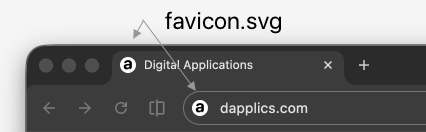
To Set an Icon for a Website
You need to add the following tag inside the <head>...</head> tag in your HTML file:
<link rel="icon" href="/icons/favicon.svg">
If you want to set different icons for different themes:
<link rel="icon" href="/icons/favicon-dark.svg" media="(prefers-color-scheme: dark)">
<link rel="icon" href="/icons/favicon-light.svg" media="(prefers-color-scheme: light)">
Use the .svg format so that your icon displays clearly at all screen resolutions.